Integrations overview: what DecisionVault connects to
DecisionVault connects to the tools your firm already uses, so client intake flows straight into your case management, drafting, and automation systems. This page lists the integrations by category. Each tool has its own setup guide in this Knolwdege Base, so search for the tool's name to find the step-by-step instructions.
All integrations are connected from Settings > Integrations in DecisionVault.
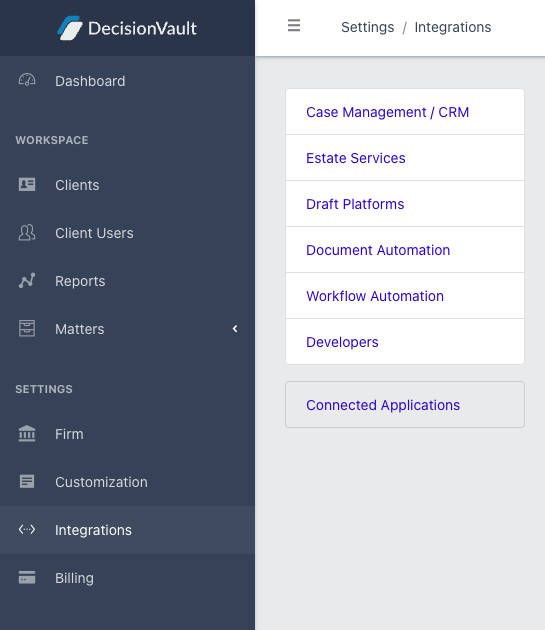
Case management and CRM
Sync matters, clients, contacts, and custom fields from DecisionVault into your practice management or CRM system:
- Clio Manage
- Actionstep
- EstateWorks
- HighLevel (including white label versions such as Accelerator Pro and Attorney Fuel)
- HubSpot
- Lawcus
- Lawmatics
- LEAP
- MyCase
- PracticePanther
- Smokeball
- Zoho CRM
Estate services
Push intake data into estate administration and settlement platforms:
- Estateably
- EstateView
- Trustate
Draft platforms
Bring client and contact information into your drafting system:
- WealthCounsel
- Interactive Legal
- Lawgic
Document automation
Push contacts and financial inventory data into document and diagram generation:
- Gavel
- Document Merge and Diagram Merge (built into DecisionVault)
Workflow automation and developer tools
For everything else, or for building your own automations:
- Zapier, for no-code automations with thousands of apps
- Webhooks, which also work with tools like Make and n8n
- The Open API, documented at api.decisionvault.com
- The DecisionVault MCP Server, for AI assistants
Frequently Asked Questions
Where do I connect an integration?
In DecisionVault, go to Settings > Integrations, find the card for your tool, and authenticate. Each tool's setup guide in this Help Center walks through the details.
Is the sync real-time?
No, syncs run on demand. You start a sync from the matter's sync screen, which shows you exactly which records will be created or updated before anything happens.
What if my tool is not listed?
Zapier, webhooks, or the Open API can usually bridge the gap. If you are unsure, reach out to support and we will point you in the right direction.